Starting with a new IP address for email sending is one of the most delicate phases of any email program. Whether you’re migrating to a new platform, scaling your sending volume, or recovering from deliverability issues, how you manage the early stages of sending can shape your sender reputation for months to come. At the center of a successful IP warming strategy is one often-overlooked factor: email authentication.
Authentication is not just a technical checkbox to tick before you start sending. It is the foundation that tells mailbox providers who you are, that you are authorized to send on behalf of your domain, and that your messages can be trusted. Without it, even the most carefully planned warm-up schedule can fall apart before it gains momentum.
What is IP warming and why does it matter?
IP warming is the process of gradually increasing email sending volume from a new or previously dormant IP address. Mailbox providers like Gmail, Outlook, and Yahoo assign reputation scores to IP addresses based on sending behavior over time. A new IP has no reputation, so providers treat it with caution. By slowly ramping up volume and demonstrating consistent, positive engagement, you build the trust needed to reach the inbox reliably.
The stakes are high because reputation damage during the warm-up phase is difficult to reverse. Sending too much too fast, or sending to unengaged or invalid addresses, can trigger spam filters and result in blocks or deferrals that set your program back significantly. A structured IP warming strategy typically spans several weeks and involves sending to your most engaged subscribers first, then expanding to broader segments as your reputation strengthens. For a deeper look at how this process works, our guide on Migrations and Warmups covers the full picture.
What is email authentication and how does it work?
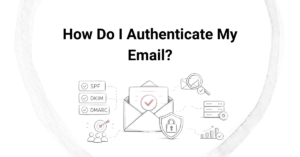
Email authentication is a set of technical protocols that verify the identity of the sender and confirm that a message is legitimate. The three core standards are SPF (Sender Policy Framework), DKIM (DomainKeys Identified Mail), and DMARC (Domain-based Message Authentication, Reporting, and Conformance). Together, they allow receiving mail servers to confirm that an email genuinely originated from the domain it claims to represent.
Each protocol plays a distinct role. SPF specifies which IP addresses are authorized to send mail on behalf of your domain. DKIM adds a cryptographic signature to each message, allowing the receiving server to verify that it has not been tampered with in transit. DMARC ties SPF and DKIM together by defining what should happen when a message fails authentication checks, and it provides reporting so you can monitor your sending ecosystem. When all three are properly configured, mailbox providers receive clear, verifiable signals that your messages are trustworthy.
Why does authentication matter during IP warming?
During IP warming, authentication directly influences how mailbox providers evaluate your new IP. Without passing authentication checks, your messages lack the identity signals that providers use to distinguish legitimate senders from spammers. Even with a clean list and great content, unauthenticated mail from a new IP is far more likely to be filtered, deferred, or blocked outright.
Authentication also protects your domain reputation alongside your IP reputation. These are two separate but interconnected scores. If your IP warms up successfully but your domain has authentication gaps, you can still face deliverability problems. Conversely, a well-authenticated domain builds credibility that supports your IP’s reputation during the warming process. Think of authentication as the credential that introduces your new IP to the inbox.
What authentication protocols should be set up before warming an IP?
Before sending the first warm-up email, all three core authentication protocols should be fully configured and verified. Skipping this step means starting the warm-up process at a disadvantage that is difficult to recover from mid-campaign.
- SPF: Publish a valid SPF record in your DNS that includes all IP addresses and sending services authorized to send on behalf of your domain.
- DKIM: Configure DKIM signing for your sending domain and verify that the public key is correctly published in your DNS records.
- DMARC: Set up a DMARC policy, starting with a monitoring-only policy (p=none) if needed, so you can collect reports without risking legitimate mail being rejected while you refine your setup.
- BIMI (optional but valuable): Brand Indicators for Message Identification allows your logo to display in supported inboxes, adding a visual layer of trust that reinforces your sender identity.
It is also worth confirming that your sending domain is properly aligned with your authentication records. Alignment means that the domain in your “From” address matches the domains referenced in your SPF and DKIM configurations. Misalignment is a common cause of DMARC failures even when SPF and DKIM individually pass.
What happens if you warm an IP without proper authentication?
Warming an IP without proper authentication is likely to result in poor inbox placement, high deferral rates, and potential blacklisting. Mailbox providers have become increasingly strict about authentication requirements, and many now treat unauthenticated mail as a strong spam signal by default.
Beyond immediate deliverability problems, the reputational damage can compound. If your warm-up messages land in spam or get blocked, engagement metrics suffer. Low engagement during the warm-up phase signals to providers that recipients do not want your mail, which further damages the IP reputation you are trying to build. In some cases, recovering from a failed warm-up requires starting over with a new IP, which costs time and disrupts your email program. Authentication failures can also expose your domain to spoofing and phishing attacks, since without DMARC in place, bad actors can send mail that appears to come from your domain without detection.
How can you tell if your authentication is working correctly?
You can verify that authentication is working by checking your DMARC reports, using email header analysis tools, and monitoring deliverability metrics from the start of your warm-up. DMARC aggregate reports (RUA reports) provide a breakdown of how your mail is performing against SPF and DKIM checks across different receiving domains.
Several free and paid tools can help you inspect individual email headers to confirm that SPF, DKIM, and DMARC are all passing. Sending a test message and reviewing the full headers in a mail client or via a service like MXToolbox or Google’s message header analyzer gives you a clear view of authentication results. During the warm-up period, watching for sudden drops in open rates, increases in bounce rates, or deferral messages from major providers can also indicate authentication issues that need to be addressed. Catching these problems early, before volume scales up, is far easier than diagnosing them mid-campaign.
How Email Industries helps with IP warming strategy
We have spent over two decades helping organizations navigate the complexities of email deliverability, and IP warming is one of the areas where expert support makes a measurable difference. Our team works with you to build a solid foundation before a single warm-up email is sent, and we stay involved throughout the process to monitor performance and resolve issues quickly.
Here is what we bring to your IP warming strategy:
- Full authentication setup and auditing, including SPF, DKIM, DMARC, and BIMI configuration
- Domain alignment verification to prevent DMARC failures before they affect deliverability
- Warm-up schedule planning tailored to your sending volume, list quality, and business goals
- List hygiene and validation using Alfred, our email verification and threat detection tool, to ensure you are warming up with clean, engaged addresses
- Ongoing monitoring and reporting throughout the warm-up period, with expert guidance when issues arise
- Blacklist monitoring and remediation support if problems occur during the ramp-up
Whether you are migrating to a new ESP, launching a new sending domain, or rebuilding after a deliverability setback, we can help you do it right. Learn more about our approach on our Migrations and Warmups page, or reach out directly to talk through your situation with someone who understands the details.
Related Articles
- What is DKIM and how does it protect your email?
- What is the difference between SPF pass and SPF fail results?
- What minimum budget is needed for full service email marketing?
- How do email advertising agencies handle creative development?
- Should you hire an expert for an email platform migration?
- How do you monitor domain warmup progress effectively?
- How do mailbox providers evaluate a new sending domain?
- What is a domain warmup schedule and how do you build one?
- When should you pause your IP warming schedule?
- How do you recover from a failed IP warming attempt?
- How do you choose the right list segments for IP warming?
- What is email marketing compliance management?
- How do agencies calculate email marketing revenue?
- How long does blacklist removal typically take?
- What tools do professional email agencies use?