Switching email platforms is one of the most technically demanding tasks in email marketing, and it carries a real risk that’s often underestimated: subscriber engagement can take a serious hit before you even send your first campaign from the new system. Whether you’re moving from one ESP to another to gain better features, lower costs, or improved deliverability support, the way you handle the transition directly determines whether your subscribers stay engaged or quietly drift away. Understanding the mechanics of email platform migration is the first step toward protecting what you’ve worked hard to build.
This article walks through the most common questions marketers ask when planning or recovering from an email migration, covering everything from pre-migration preparation to post-migration deliverability checks. If you’re in the middle of a platform switch or planning one soon, these answers will help you navigate it with confidence.
Why does subscriber engagement drop during an email platform migration?
Subscriber engagement drops during an email platform migration primarily because inbox providers treat your new sending infrastructure as an unknown entity. Your new IP addresses have no sending history, your authentication records may not be fully configured, and mailbox providers have no basis to trust your reputation yet. This combination causes more emails to land in spam folders, reducing opens, clicks, and replies.
Beyond the technical side, there are operational factors at play, too. Data migration errors can result in subscribers receiving duplicate messages, missing personalization, or emails that feel out of sync with where they are in your customer journey. Timing gaps between platforms can also mean subscribers go uncontacted for longer than usual, weakening the engagement habit your campaigns previously built.
Another overlooked cause is list quality. When you import your subscriber list into a new platform, any existing invalid, dormant, or risky addresses come along for the ride. Sending to these contacts from a fresh IP amplifies the deliverability damage, since inbox providers watch your new sending infrastructure especially closely during the early days.
What should you do before migrating to a new email platform?
Before migrating to a new email platform, you should audit your subscriber list, document your current sending configuration, and verify that your new platform supports the authentication standards and integrations you rely on. Preparation done before the switch dramatically reduces the risk of deliverability disruption and engagement loss afterward.
Clean your list before you move it
Importing a bloated or unvalidated list into a new platform is one of the most common migration mistakes. Run your subscriber data through an email verification process to remove invalid addresses, spam traps, and high-risk contacts before the migration. Starting with a clean list gives your new IP addresses the best possible foundation during the critical early sending period.
Document your current sending setup
Before you flip the switch, record every detail of your existing configuration: sending domains, subdomains, DNS records, suppression lists, automation workflows, and segmentation rules. This documentation serves as your blueprint for accurately recreating the setup in the new platform and helps you spot gaps before they become problems.
Plan your timing carefully
Avoid migrating during peak sending periods, such as major promotional events or seasonal campaigns. A quieter period gives you room to troubleshoot without the pressure of high-stakes sends. Communicate transparently with your team about the timeline so everyone knows what to expect during the transition window.
How does IP warming affect engagement during a platform switch?
IP warming directly affects engagement during a platform switch because inbox providers assign reputation scores to IP addresses based on observed sending behavior. A new IP has no reputation, so providers default to caution, routing more of your mail to spam until the IP demonstrates consistent, legitimate sending patterns. This reduced inbox placement means fewer subscribers see your emails, which suppresses engagement metrics.
The warming process involves gradually increasing your sending volume over several weeks, starting with your most engaged subscribers. By sending to people who reliably open and click, you signal to inbox providers that your list is healthy and your content is wanted. As your reputation builds, you can expand to broader segments of your list.
Skipping or rushing IP warming is a common and costly mistake. Sending at full volume from a cold IP can trigger spam filters at scale, damaging your sender reputation before it has a chance to form. A disciplined, phased approach to warming protects engagement by ensuring your emails actually reach the inbox during the transition period. For a deeper look at how this process works, our guide on Migrations and Warmups covers the full strategy in detail.
What email authentication steps are critical when switching platforms?
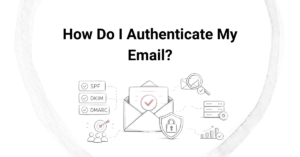
The critical email authentication steps when switching platforms are setting up SPF, DKIM, and DMARC records correctly for your new sending infrastructure. Without these, inbox providers cannot verify that your emails are legitimately sent from your domain, which significantly increases the likelihood of messages being filtered or rejected.
- SPF (Sender Policy Framework): Update your SPF record to authorize your new platform’s sending servers. If you’re moving away from your old platform entirely, remove the old platform’s servers from the record to avoid conflicts.
- DKIM (DomainKeys Identified Mail): Generate and publish new DKIM keys for your sending domain within the new platform. This cryptographic signature proves your emails haven’t been tampered with in transit.
- DMARC (Domain-based Message Authentication, Reporting and Conformance): Ensure your DMARC policy is in place and that both SPF and DKIM align with your sending domain. DMARC also provides reporting that helps you monitor authentication failures during the migration period.
Many deliverability issues that appear after a migration trace back to incomplete or misconfigured authentication records. Double-check your DNS settings after publishing any changes, and use authentication testing tools to confirm everything is resolving correctly before you begin sending from the new platform.
How do you keep subscribers engaged throughout the migration process?
To keep subscribers engaged throughout a migration, prioritize your most active subscribers first, maintain a consistent sending frequency, and avoid any unexpected gaps in communication. The goal is to make the transition invisible to your audience so their relationship with your brand continues without interruption.
Start with your highest-engagement segments
During IP warming, your most engaged subscribers are your most valuable asset. By prioritizing people who regularly open and click your emails, you not only build IP reputation faster but also ensure that the subscribers most likely to stay engaged continue receiving your content reliably from day one.
Maintain your sending rhythm
Inconsistent sending is one of the fastest ways to lose subscriber attention. If your audience expects to hear from you every Tuesday morning, a migration is not a reason to break that pattern. Plan your migration timeline so your regular sends continue on schedule, even if that means running both platforms briefly in parallel during the transition.
Avoid re-permissioning unless necessary
Some brands use a migration as an opportunity to send a re-permission campaign asking subscribers to confirm their interest. Unless your list is genuinely stale or you have a compliance reason to reconfirm consent, this approach typically reduces your active list size without a meaningful benefit. Focus instead on delivering value and letting engagement metrics guide your list management decisions.
How do you know if your migration hurt your email deliverability?
You can tell a migration hurt your email deliverability by monitoring key metrics in the weeks following the switch. A meaningful drop in open rates, a rise in spam complaints, an increase in bounce rates, or a decline in click-through rates are all signals that your emails are not reaching the inbox at the same rate as before the migration.
Inbox placement tools provide a more direct view than engagement metrics alone. These tools send test messages to seed accounts across major inbox providers and report on whether your emails land in the inbox, the promotions tab, or the spam folder. If your inbox placement rate drops significantly after the migration, that confirms a deliverability problem rather than simply a content or audience issue.
Additional warning signs include:
- A spike in soft or hard bounces shortly after migration, which may indicate list import errors or authentication failures
- Increased spam complaint rates, which suggest that subscribers are not recognizing or trusting your emails from the new sending infrastructure
- Domain or IP blacklisting, which can happen quickly if a cold IP sends to a high proportion of invalid or inactive addresses
If you identify a deliverability problem post-migration, act quickly. Pause sends to unengaged segments, review your authentication configuration, and check whether your IP warming schedule was followed correctly. The sooner you diagnose the root cause, the faster you can restore inbox placement and re-engage your audience.
How Email Industries helps with email platform migration
At Email Industries, we specialize in helping brands navigate complex email migrations without losing the deliverability and engagement they’ve built. Whether you’re moving to a new ESP, warming a fresh IP, or recovering from a migration that didn’t go as planned, we bring the technical expertise and hands-on support to get your program back on track. Here’s what we offer:
- Pre-migration list validation using Alfred, our all-in-one email verification and threat detection tool, to ensure you migrate only clean, high-quality contacts
- Authentication setup and auditing to confirm your SPF, DKIM, and DMARC records are correctly configured for your new sending infrastructure
- IP warming strategy and execution with phased sending plans designed to build sender reputation quickly and protect inbox placement
- Post-migration deliverability monitoring to catch problems early and course-correct before engagement suffers
- Expert consulting from a team with over two decades of experience solving deliverability challenges across SaaS, eCommerce, healthcare, finance, and agency environments
If you’re planning a migration or dealing with the aftermath of one, we’re here to help you protect your sender reputation and keep your subscribers engaged every step of the way. Reach out and explore our Migrations and Warmups services, or get in touch with our team directly to talk through your specific situation.
Related Articles
- Should you migrate your entire email list at once or in segments?
- What is the difference between a managed and self-service email platform migration?
- How do mailbox providers evaluate a new sending domain?
- How do you monitor deliverability during an IP warming campaign?
- What is the difference between a warm IP and a cold IP?
- How do you choose the right list segments for IP warming?
- What engagement metrics matter most during IP warming?
- What is the difference between IP warmup and domain warmup?
- What post-purchase email sequences do ecommerce agencies recommend?
- How do agencies handle email consent management?
- What GDPR requirements affect email marketing agencies?
- What is email campaign management?
- Which industries benefit most from email deliverability agencies?
- Why is email authentication critical for delivery success?
- Can an email agency improve your sender reputation?